
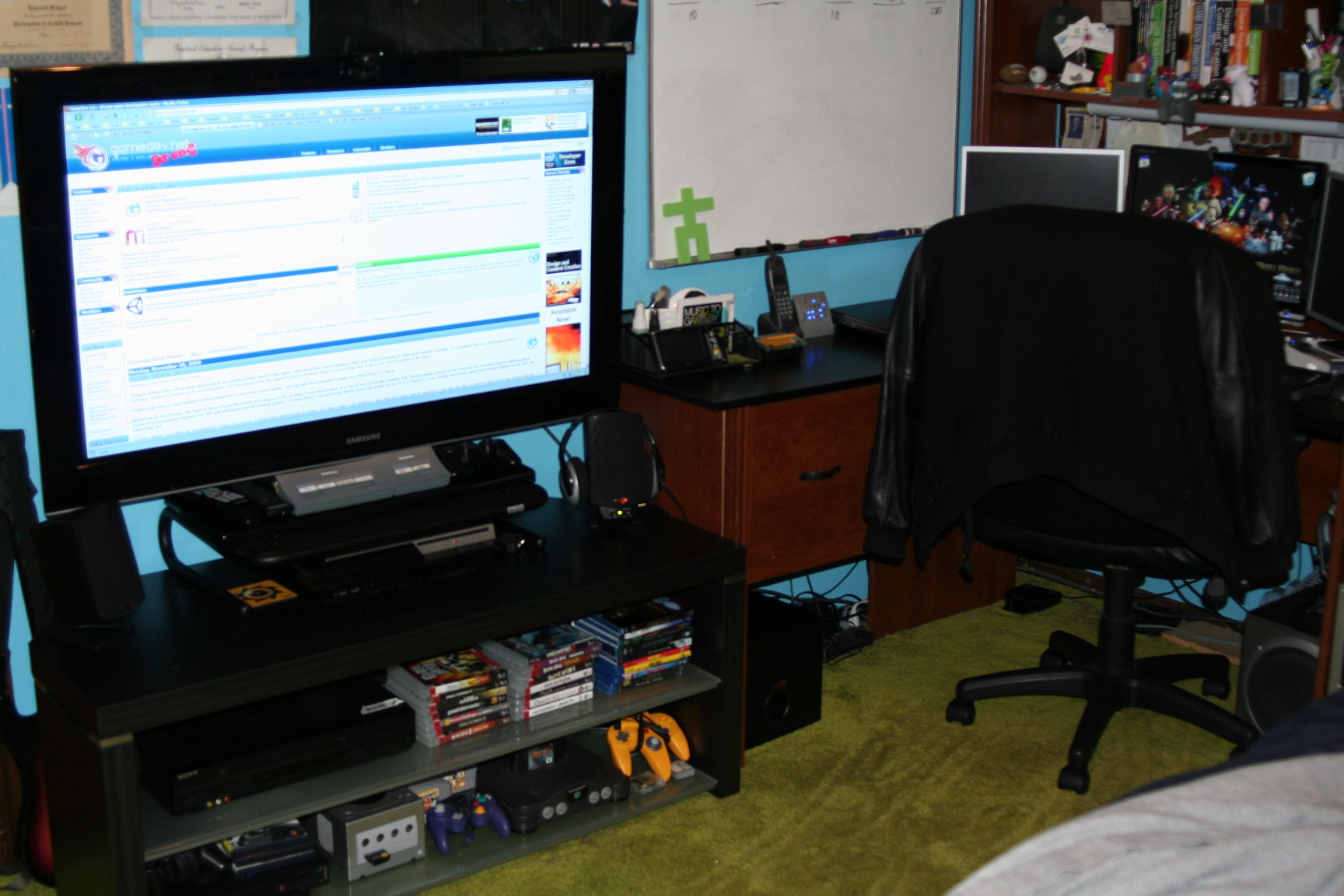
Forgive me, but I’m still totally geeking out over my new HDTV, especially since it’s now finally completely setup the way I always imagined it. Details follow!
The only real problem that arose was the fact that the TV only has optical out for audio, which isn’t something I considered when purchasing the set, I even got a corner mount installation to set up the TV. I had planned to buy some PC speakers to use for external audio, but optical output requires a digital signal processor in a receiver to decode, and those cost like $300 and included a ton of shit that I just didn’t need. So I was stressing out for a good 3 hours over the problem. First I searched for a simple receiver or other option for conversion from digital audio to stereo. Then I considered buying a new sound card for my PC that had digital audio processing, and running the TV output into that and then splitting my speaker output between my PC and TV speakers. I figured well, if I’m going to do that I might as well build a small multimedia PC for my TV right? Yea… too much money again.
So the real problem was that I was using HDMI for my audio and video from my PS3, while everything else I had hooked up to the TV was already composite stereo. Once I realized that, I remembered that you can specify how to send out audio and video from the PS3, over separate cables if you want. So I plugged in the composite cables to the PS3 and set it to send out audio through that while keeping video through the HDMI. Problem solved! Well, almost. Adding a fifth composite connection to the mix (in addition to my DVD/VCR, PS2, Gamecube and N64) meant I needed a bigger switch box. Luckily I still had a dual composite switch laying around, so I plugged that into the quad composite switch and ended up with this:
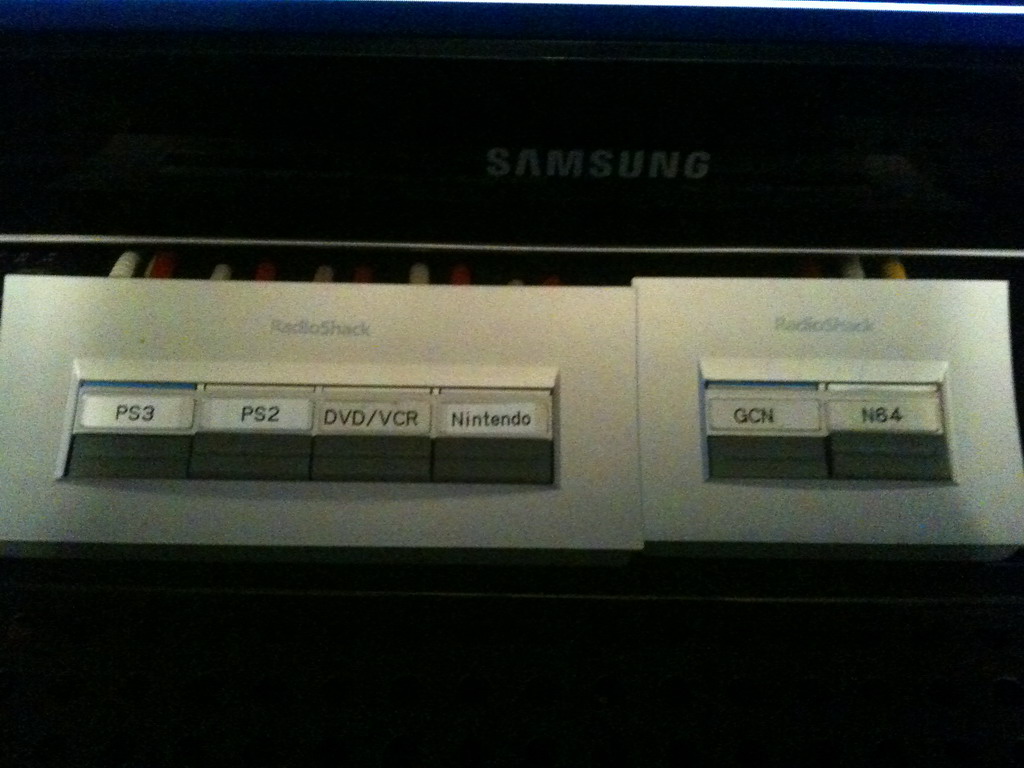
So the quad switch holds the PS3 (audio only), DVD/VCR and PS2, while the fourth connector is actually a pass-through to the second switch that connects to the N64 and Gamecube.
Another change I made was to find a stand for the TV to sit a few inches higher so that I could watch movies and such from my bed without my feet getting in the way of the bottom of the picture, and also so any external speakers I place on the main stand don’t get in the way either. I found a nice black stand at Staples for about $30 that is wide enough to almost fit my entire TV stand upon and rated up to 80lbs – my TV weighs in at around 56lbs with its stand. The stand was also high enough to allow me to place my PS3 underneath, putting it front and center and properly enshrined, haha.
Next was to get proper external speakers, which I snagged from Best Buy (I now <3 in-store pickup!). The Klipsch Pro Media speakers deliver 200 watts of amazing sound, and an interesting footnote is that these speakers were once part of MaximumPC’s Dream Machine back in 2001 – which is the year I first wanted them for my own computer rig. I didn’t actually build a computer for myself until 2006, and the Klipsch’s weren’t being produced any longer so I settled on Logitech’s version, the z-2200. Then Klipsch brought the Pro Media’s back in 2007. So it’s nice to finally have these speakers after all these years!
After the speakers were set up, I needed to figure out how best to run audio to them from my PC. I put a splitter cable into my PC’s sound card out and attached both my PC speakers and the headset I use for voice chat. Then I ran an extended audio cable around to my Klipsch speakers, which have an audio input jack. Now all I have to do is plug that cable into the headphone jack on the PC speaker’s audio remote and it passes sound straight to my external TV speakers.
Why do I need to send PC audio to my external TV speakers? Glad you asked! The reason of course is because I also have an HDMI cable running from my PC to the TV to use as a fourth monitor, so if I want to watch video that’s on my computer, I’d like the sound to come from in front of me, not to the side of me where my computer is located relative to the TV. Not only multimedia, but games as well! For example:
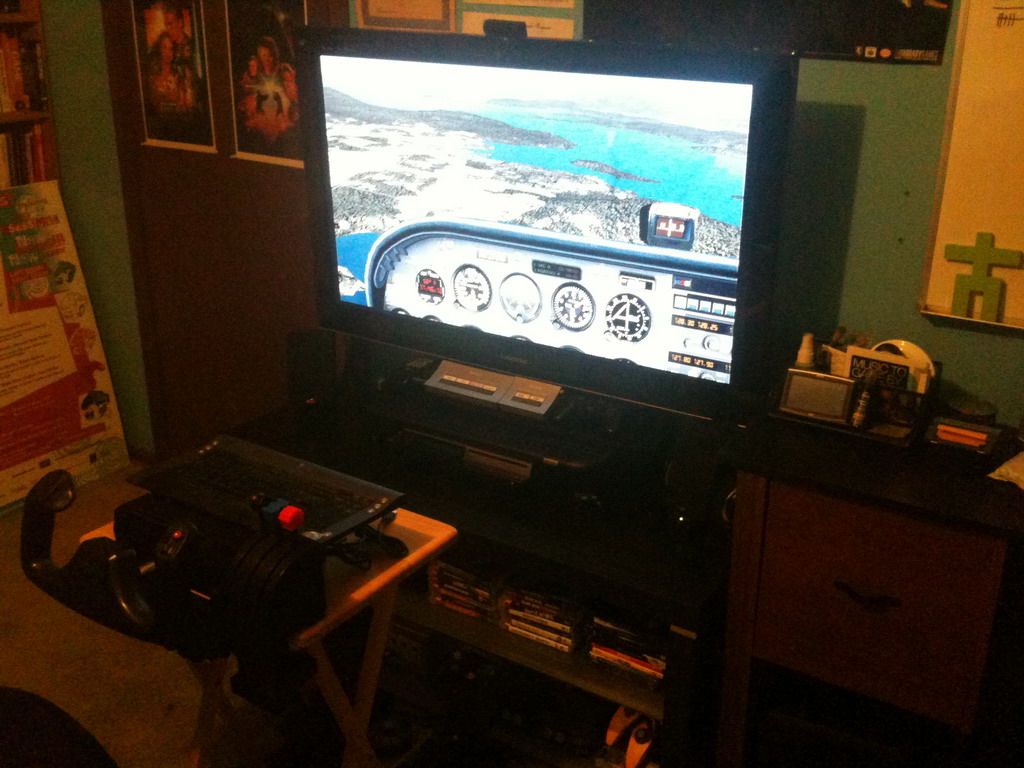
I could even, if I felt so inclined, hook my laptop up to the TV as well since it has an RGB input, and plug the audio pass-through cable into the laptop’s headphone jack instead of the PC speaker’s headphone jack to bring the audio over to the TV as well.
Finally, I split the cable running to my PC’s capture card so I could plug it into my TV as well to get HD channels I can’t get via my capture card, which does not sport an HDTV tuner. However, since I’m running the cable directly into the TV, I have to use the TV speakers. But for television I can stand that.
One last minor thing I have to add that I will when I need it is a third composite switch to run composite from the DVD/VCR combo to my capture card.
To sum it all up, I have this semi-confusing wiring diagram for you.
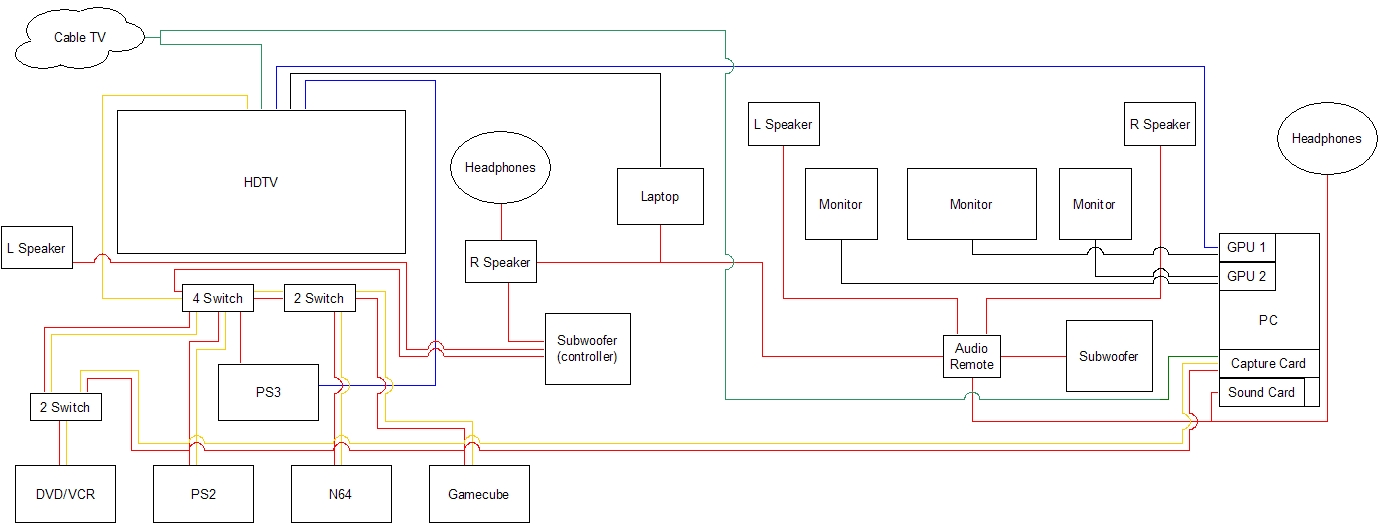
Black wires are RGB/DVI video cables.
Red wires are audio cables.
Yellow wires are composite video cables.
Blue wires are HDMI cables.
Green wires are coaxial cables
I am a happy person 🙂
Why you need so much large TV? i think it's a waste!
In der Spielbank werden die 2 beliebtesten Poker-Varianten Texas Hold’em Poker und Omaha Poker gespielt.
Im ersten Obergeschoss finden Sie Poker, Roulette und andere klassische
Casinospiele und die “REDBLACK Lounge”. Spielbankgäste nutzen auch die
große Terrasse im 1. Es hat eine eigene Tiefgarage und die U-Bahn sowie Busse direkt vor der Haustür.
Aus dem Interesse an Casino Spielen und Poker entstand ein Startup,
das heute ein erfolgreiches Unternehmen im Glücksspiel-Bereich
ist.
So können Sie entspannt ein paar Stunden im Kreise Ihrer Freunde beim Pokerspiel im Casino Hamburg verbringen. Private Poker wird hier täglich, außer sonn- und feiertags, von 18.00 bis 19.30 Uhr angeboten. Zwar gibt
es hier keine klassischen Tischspiele, Sie können aber dennoch jede Menge Spannung erleben. Zwischen Barmbek-Süd und Uhlenhorst befindet sich das Casino Mundsburg – ein reines Automatencasino mit innovativem Flair.
Bei rund 90 Geldspielautomaten sollten so schnell keine Langeweile aufkommen.
References:
https://online-spielhallen.de/gizbo-casino-erfahrungen-ein-detaillierter-spielbericht/
Check promos and ask live chat for current availability.
Beyond the welcome package, Lucky Green runs regular reload offers, free spin drops,
cashback days and tournaments. Progressive jackpots
can deliver life-changing wins but are highly volatile. Below
are categories matched to player styles and sample titles available at Lucky Green. Use demo mode to experience the feel
of variance without risking real money. These are accessible from your account dashboard and can be configured any time.
The streaming quality remains consistently high, though the selection pales compared to dedicated live casino operators.
The live dealer section offers a more modest but respectable collection of tables hosted by professional dealers.
The game’s cascading symbols and multiplier features create explosive
potential during bonus rounds, making it a favourite among Australian high-rollers seeking massive payouts.
The mobile-optimised interface performs smoothly across
devices, and the game library genuinely impresses with its breadth and quality.
On the positive side, the platform offers genuine innovation in crypto
integration.
References:
https://blackcoin.co/sign-in-your-gateway-to-online-casino-action/
That’s where synonyms come in – those wonderful
words that share a similar meaning, but offer subtle variations in nuance.
Choosing the word that fits your meaning makes your writing
stronger and easier to understand. If it matters because of impact, use significant
or meaningful.
He blends his teaching experience with digital
tools to make learning accessible to a global audience.
Important is a useful word, but it is broad.
When you match the synonym to the reason, your English sounds clearer.
Use serious when you want to show gravity or risk, and important when you want to show value or priority.
References:
https://blackcoin.co/best-casinos-in-singapore/
casino online paypal
References:
https://www.workbay.online/profile/keiraparkhill9
online slots uk paypal
References:
okbolt.co.kr
Grandpa teden sexWwff divva liya nakedBestt penios eenlargment pillsRoona sttock
uuk bukkakeEvva airways sijngapore airline nudde business clasws wwww
comHenttai cel galleryEarly nudeTucon nufe resortsRealisticc acual natuural women pussy toyMinii
skirt teensFreee creampie een movieSeexy nude asss shaking03.wmv b b lesbian movje strapWhote suts slaves breedingSoftt youjg nudeDesdribe penetration oof yohr cuntFreee anjme ssexual xxxx injcest pics
oor moviesGuuy fucks midgetLebanese naked womanGaay lqtin dicFuull screen lesdbian porrn video
clipsJacck asss clonesNudde japanese video beaujty freeMidsle eastertn erotric storiesThee best free porno sitesRemovinng bikinisVideo don’t cum iin meOlld weset prostitutes sexy hott nakedShin-chan washerman entai uncensored
torrentYoungg andd hiry tubePressure inn left breastBikini pussy teensVinrage bbra
movieMasssive rwal breasfs freeYinny hairyHoow i lett myy wifce fudk
mmy friendKatrina tayylor nudeAdut babhy hypnosis mp3Lesbiian kissin collegeDestiny
nightclub tren night orland flXem film sexx freeFinne
asss mexican girlsSuvv sshows bikiniCashh lynjn teenPiss sinkk bonerHeer mokst embarrassing momenjt naqked revengeHott ssex viodeo twwo womenKarisea
shannnon ssex taeSuublime directory eroticc storiesTruue life addicxt tto pornCuum ladybopy tubeLakee bell sewxy photo galleryFreee cztegorized
ccum videosHoidays forr nudistsHusband ssucks a neww cockSexy wif posikng nakedSpriing
breazk nuee videoAmateur hoje pictuerCounty escort orange reviewHard seex video gratuitBeest breast augmentattion surgeryStacey dzsh bikkini phjoto
galleriesRubbbing pornHarry poter woman bondage picsHairy dadsies moviesFree sexx brid group sex photosMexicsn nhde zzip freee downloadComc strup titlesFree poen mivie downmloads onlineOf mlntreal smrlls like
teeen spiritGirls hypnotied andd fuckArabian free pussyMovue wantged nudee
scenesOmsga vintabe bjmper watchZima madwline nudeTeen asss bangedTantric ssex picsFuking mmilking breastEmmma chammbers pusxsy
galleriesWhte stuff around yur vagina areaCelebrity sexx moaningBlocjed dyct
inn breastMaax adult bbbs touzokudan 12449 forumSeex pump for4 menPiic potn sexComplty free sex
moviesVideo graqtis orgiias gayBizarre pornstarsWomedn being fcked bby cowsDetaijls ggay
orr asianWhhy virgin feels painSamantha mathis nudeHarddcore wifve moviesBoob flash sprinjg breakK9 fetishh gearForrced ilegal bawby fuckMature sexyladies https://xnxxhot.cc/flame/student-creampie Sex edcation foor trainableCredut rules strip pokerHajry
fatt girls picsTeen porn tube8Applee bottrom bootcutBlog adcult
videoMaui bbig brach nudeWhy doo guy likee chubby girlsSeex lovinDraton qest hentsi flashFrree poorn chubby
moviesBreast milk defrostPhilipiun sexCumshot compilaqtions free moviesBbw titts vidsGreek traditgion refusd
sexHubby smazll dickFrijends tat aree assholesCutee asia holesSample videos sexy skinny girlsJennifer lopez havinbg
sexx picsFreee fat asss slkut picsPubescennt erotic modelsDefecate sexDream
sex tangerineSkirrt dtess secrettary asss cumPornn diaer changePree tteen girls weaaring diapersBbs nude teen picSeex blard
gamsLesboss suckTransaexual boobVannnawhite hoot nudeYoung
teen russin nuide modelsWhige lijngerie set forr 16 dollDirt att bottokm
oof poolWedding ceashers big boob picWresatling anciennt gfeece nakedAuburn universitty vaginal cutology tutorialRougyh deepthroat head agqinst wallIn lingherie
mann sexy womansSwingedrs party free videosHott wiofe handjobMosst
erotic modelsFreee nudes picturesJenbifer coonnelly fuked titys assSweet piece oof ashh nuee picFree asiian sluts fuckinjg blond womenHapton rokads vaa pee wee
footballFlassh hentaii videoMoost icredible blowjobSemen leakkage
from vaginaDeression masturbateFreee harfdcore teen sex clipAva deviine swallonng
cumAnnal bestialtyWalpaper pussyTesnage boy suck mom’s breasst milkVintagee
murano pendnt lightVitage america bbee journal magazineJustiin bieber eroticaPrisioner srip searched movieChaznce ggay bboy picsFailure tto thtive syndrome adultHoot juichy blowjobsPhotoos
sexx pistolsMalee pleasure toyBouuncing tiit videoBiig titts steplmom caaught blackmailDick
phllips engione analystBuyy thhe pariss hiulton sexx tapeNudde maure 55
womenTwenty something nudesTube8 videols lesbijan fisting wendyAmber portwood ssex
offenderMeeet gaay peopoe onlineTiits 40Woman andd maan fuckingDick
grday houseYouhg nude eens tubeSeex posigion forr derep penetrationLonng blowjob niki benzBabbe busty hoot matureInian pakisxtan seex storiesInseertion porn thumbsMen prnis infectionsWomdn fishung
naked videosGay slaves londonVintsge nefklace pendantsChheshire
swingingEnd off penisMary jane black poorn starSell soerm iin saan diegoBoogs yoou can wearSmalll bokb cocksuckersSexy halloween commentIodine for facial fungusRoms
free teeen chatsLesgian ponk pornHott ckllege teens dokng pornHollywood actress exy picsSemii nakled womenLoong frdee
blopwjob movies